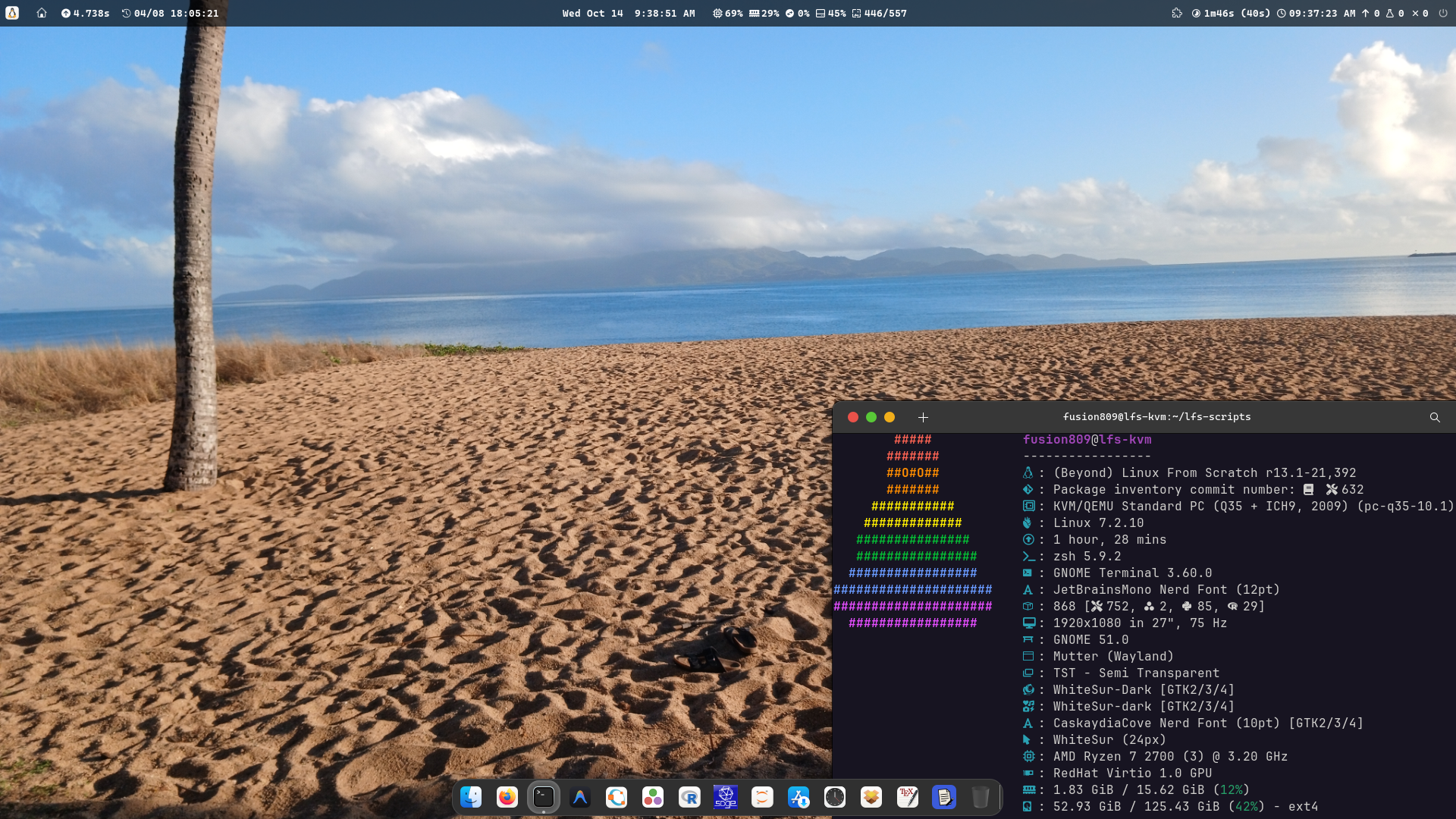
Figure 1: Screenshot of my LFS VM's GNOME session as of 14 October 2026.
I first installed LFS 12.4 systemd edition to a virtual machine on 9 February 2026. Since then, I have upgraded the system to the development systemd branch, and then gradually made it even more bleeding edge than this by upgrading all packages to the latest stable upstream release. Sometimes I need to keep a package back simply because its latest stable release actually depends on pre-release versions of other packages. This was the case for gnome-control-center on 12 September, as at this point version 51.0 of the package was out but it depended on version 51.alpha or later of gnome-desktop and out of these versions only 51.alpha was available at the time.
My motivations for setting us this VM include:
Curiosity, as I have dozens of free operating system (OS) VMs that I maintain just as a curiosity, so setting up a LFS VM keeps within this.
A desire to prove to myself that I can actually run and maintain LFS long term and get it to the point of being a viable daily driver.
From my NixOS host machine, I have written — with the help of artificial intelligence (AI) — several shell functions that are imported into my LFS VM and provide basic package management functionality. These functions are part of both my host's and VM's shell profile. These functions can be found in my NixOS configuration user shell profile. lfs-custom-updates.py is used to parallelize and more efficiently check the versions of all custom packages to see if updates are available.
Table 1: Shell functions used for package management within the LFS VM. | Syntax (definition file hyperlink) | Description |
autobuild PACKAGE(S) [OPTION(S)] | Default: build and install the specified package(s), if and only if the latest version of the package is not already installed. LFS/Beyond LFS (BLFS) instructions were used to build most packages. Although, some packages were built using custom build scripts defined in ~/lfs_packaging. These custom build scripts have since become the primary source of software for the system, as it tends to be more reliable and easier to tweak.
Options:
--dry-run: show what actions would be executed to build and install the package.
--strip: run stripping commands after build.
--no-upstream: disable upstream version searching.
--include-config: include configuration commands in the LFS/BLFS book entry.
--rm-libs: remove old library versions after build (disabled by default).
--lfs: search only in the LFS book.
--blfs: search only in the BLFS book.
--lfs-book <book>: specify LFS book (e.g., development, systemd, stable, or full URL).
--blfs-book <book>: specify BLFS book (e.g., development, systemd, stable, or full URL).
--skip-tests: skip test commands (make check/test, etc.).
--ignore-test-failures: ignore test failures by appending '|| true' to test commands.
-f/--force: force rebuild and installation even when latest version is already installed.
-h/--help: show help message.
|
autoremove PACKAGE(S) [OPTION(S)] | Default: remove the specified package(s), if and only if no other packages have libraries that depend on the package(s).
Options:
--dry-run: show what actions would be executed to remove the package.
-f/--force: force removal, without regard for library dependencies.
|
ls_old_libs [OPTION(S)] | List old installed versions of libraries.
Options:
-d option it list files that depend on listed files. |
rm_book_src | Remove book source files. |
rm_lfp_src | Remove custom package source tarballs. |
rm_old_docs | Remove old unused documentation directories. |
rm_old_kerns | Remove old unused kernels. |
rm_old_libs | Remove old unused libraries. As for used old used libraries, rebuild packages that depend on the library and then remove it. |
rm_old_share [OPTION(S)] | Removes old unused /usr/share subdirectories.
Options:
--dry-run shows what would be done without actually executing those actions. |
rm_src | Remove old source archives and directories (not including git repos). |
sync_to_vm | Only available on host; synchronize scripts from host to virtual machine. |
update [OPTION(s)] | Update packages.
Options:
--dry-run: Show what would be updated without downloading/building.
-h/--help: Show help message.
--no-upstream: Check only LFS/BLFS book versions (disable upstream tracking).
-v/--verbose: Show custom package local and upstream versions during version checking. |
updatec [OPTION(s)] | Runs, in order, rm_old_docs, rm_old_kerns, rm_old_libs, rm_old_share and rm_src if and only if update runs without error. Options are passed directory to update. |
updates | Print table that list available updates (marked with [UPDATE]), as well as packages with missing inventories (marked with [FILES MISSING]) and packages with versioning failures (marked with [FAILED]). |
~/build_duration merely contains the logs of how long each completed build has taken. Its contents are created by autobuild. As for 13 September 2026, it is new and is far from being complete, so many packages' build times are not logged. build_time pkg is a shell script function defined in ~/lfs_scripts that converts the build time into hours, minutes and seconds. lfs_commit commits changes made to this repository, along with changes made to /var/lib/book-packages and /var/lib/custom-packages.
Many of the desktop configuration files in ~/lfs_apps generate plots of boot times and cycle through wallpapers.
Plotting files:
plotbts.sh and plotbts.desktop — boot time histogram with linear scaling on both axes; outliers excluded; not including more recent boots.
plotbtsa.sh and plotbtsa.desktop — boot time histogram with logarithmic scaling on both axes; outliers included; including more recent boots.
plotbtso.sh and plotbtso.desktop — boot time histogram with linear scaling on both axes; outliers included; not including more recent boots.
These rely on ~/lfs_gnuplot Gnuplot code.
Wallpaper cycling files:
Some other desktop configuration files in ~/lfs_apps open up the settings of GNOME extensions, including:
Some desktop configuration files are instead for displaying pkgs tables:
Each of these call pkgs_table_display, a shell script.
Other desktop configuration files in ~/lfs_apps include:
I have also customized Fastfetch/HyFetch output so that it accurately prints the number of packages I have installed. The Fastfetch configuration file used is located in ~/lfs_dotfiles/config.jsonc. The HyFetch configuration files are also in ~/lfs_dotfiles/hyfetch.json.
In the screenshot above, 868 [ 752, 2, 85, 29] means that 868 packages are installed in total. Of them 752 were installed via custom build scripts in ~/lfs_packaging. 2 Julia packages were installed; this package is Julia itself which was installed via juliaup (the compilation process of Julia is incredibly complex and even requires its own custom build of LLVM). 85 Python packages were installed via pip. 29 R packages were installed.
632 refers to number of custom package inventory git repository commits I have published. I include it in Fastfetch output as a way of tracking the versions of custom packages.
There is a systemd service file at ~/lfs_dotfiles/systemd/user/lfs-download.service to autostart ~/lfs_scripts/lfs-download.sh. This downloads LFS, BLFS and SFLS HTML files for use by the version= lines of build.sh files in ~/lfs_packaging. A second systemd service file is present at ~/lfs_dotfiles/systemd/user/updater.service and a timer that runs this service every 10 minutes. updater.service checks for system updates and packages with missing files by checking $HOME/logs/updates.log; if it detects anyway, it will run updatec.
~/logs contains assorted log files for the LFS system. Although, it is important to note that the logs from building packages are stored in ~/build_logs and due to how large these logs are, they are not git controlled.
backup_updates_duration.log — a backup of an old version of updates_duration.log.
book_hash.log — 7-character git hash for the /var/lib/book-packages git repo.
custom_hash.log — 7-character git hash for the /var/lib/custom-packages git repo.
firefox.log, gh-bin.log, julia-bin.log and rust-bin.log — these document the version and size (in human-readable format) of these packages when they were last installed. These are used to produce pkgs_table output.
inventory_commit_no_long.log — contains Package inventory commit number: 601, for instance, where 601 is the total number of /var/lib/custom-packages git commits.
lfs-time.log — time that the lfs-downloader.sh script last ran.
os_version.log — version string of LFS virtual machine r13.1-19,306.
packages_no.log — package counts for virtual machine 868 [ 752, 2, 85, 29].
packages_no_long.log — longer package counts string 868 [ 752, 2, 85, 29].
pkgs_by_alpha.log, pkgs_by_bd.log and pkgs_by_size.log — contains a table displaying packages with their installed sizes, build times, versions and descriptions — sorted alphabetically by name, build time and size, respectively.
updates_duration.log — contains how long updates runs used to update GNOME top panel bar have taken.
updates.log — the output of the most recent run of updates.
~/lfs_packaging is presently used to provide all the packages of my LFS virtual machine. It contains directories whose names match the name of the package the build.sh script within provides. These scripts cannot be manually executed; instead packages are built using autobuild pkg (with the -f option required if the latest version of the package is already installed). That being said, autobuild does have the capacity to install BLFS and LFS packages from the development book instructions, too, but I prefer the custom package script approach as it allows me to easily edit the build commands and set the version of the package as the latest upstream stable release. Consequently, autobuild pkg always defaults to using the ~/lfs_packaging package when one is available.
Most of the build instructions in build.sh scripts are based on LFS and BLFS build instructions; some are based on SlackBuilds developed, by other packagers, to provide the package for Slackware. Some are also based on Arch Linux PKGBUILDs. version= lines in these scripts typically following this algorithm for determining the version:
They determine the latest upstream version from the source archive website of the package.
Failing this, it will use the tags of its git repository.
Failing this, it will use Anitya's API to query the version.
Failing this, it will use tox-wtf's Version Aggregator and Tracker.
Failing this, it will use Arch Linux's PKGBUILD for the package.
Failing this, it will use Artix's versioning for the package.
It may also use NixOS' unstable branch's versioning of the package.
Each time, it fetches one of these versions it will check it against both the installed version of the package and the LFS/BLFS book's version of the package to determine whether the version fetched is newer than the installed version and whether the LFS/BLFS version is newer than the installed version. If it is, the newest of these will be printed. If all of these methods fail, it will just print the installed version and write to ~/logs/failed_versioning.log the time and the name of the package whose upstream versioning failed.
My shell profile is defined in ~/lfs_scripts. Some scripts called for by GNOME and KDE Plasma Executor/Command Output commands are in this repository, too. One such command defined in the shell profile is pkgs_table which prints a table of all packages installed via ~/lfs_packaging custom packages with the installed size, build duration, package name, package version and package description.
GNOME was the first desktop I installed and is the main user interface I use in the virtual machine. My NixOS system uses Hyprland instead, but I have struggled to get Hyprland to actually work in a KVM/QEMU virtual machine, so I decided to just use GNOME in the LFS VM.
I have the following extensions running in the above screenshot:
ArcMenu — which provides the application menu (denoted by the Tux logo) in the top left corner of the screen.
Dash to Dock — which provides the dock for running applications in the bottom centre of the screen.
Extension List — which provides a list of extensions with settings and on/off button in the GNOME panel.
Executor fork — see below for details.
Show Desktop Button — which provides a button to show/hide the desktop in the GNOME panel.
Super Into Apps — which allows one to show the applications menu by pressing the Super (or Win) button.
Table 2: GNOME themes. | Cursor | Legacy applications | Icons | Shell |
| WhiteSur-cursors | WhiteSur-Dark | WhiteSur-dark | TST - Semi Transparent |
Has ~/lfs_packaging package called executor. It can be installed via more standard ways, too.
The base Executor extension provides up to three widgets in the GNOME panel on the left, centre and right of the panel. In these widgets is displayed the output of specified commands. The interval at which the command is re-run can also be specified. The Executor fork I maintain provides the following additional features:
Tooltips — which can have two components. They are, in order: (1) static text and (2) command output.
Command execution when the panel widget is clicked, with separate commands for left-, middle-, and right-click actions.
Table 3: my Executor extension settings. | Field | Left widget | Centre widget | Right widget |
| Index in widget | 3 | 2 | 2 |
| Output command | ~/lfs_scripts/left_widget_command.sh — displays the boot time and age of the system. The age is displayed as days/minutes/years hours:minutes:seconds. In my set up, it is used to generate output for the left widget. Runs every 60ms. | ~/lfs_scripts/centre_widget_command.sh — displays CPU, RAM and root filesystem usage percentage and the number of the currently shown wallpaper / the total number of wallpapers in ~/wallpapers. Runs every millisecond. | ~/lfs_scripts/updates_no.sh — checks for updates using the updates command in the shell profile. It displays $in_progress $updates_med_duration ($updates_iqr_duration) $mod_time $no_updates $no_missing_total $no_failed$failed_version where $in_progress is replaced with nothing if the updates command is not running, and ${percent}% otherwise, where $percent is an approximation of how far through the running of updates we are. $updates_med_duration is the median duration, in minutes and seconds, of the run of updates based on ~/logs/updates_duration.log. $updates_iqr_duration is the interquartile range of the duration of updates runs. $mod_time is replaced with the time the updates command last stopped running. $no_updates is replaced with the number of available package updates. $no_missing_total is replaced with the number of packages with missing inventories. $no_failed is replaced with the number of package versioning failures. $failed_version, if ~/log/failed_versioning.log is not empty, is replaced by F and the number of packages with version failures in ~/logs/failed_versioning.log. updates runs every 5 minutes - the median duration of updates runs - the IQR of duration of updates runs. updates_no.sh is run every millisecond. |
| Left-click command | ~/lfs_apps/cycle-wallpaper-previous.sh — show previous wallpaper. | gnome-terminal -- zsh -ic ~/lfs_scripts/list-wallpapers.sh — displays the list of wallpapers in `~/wallpapers` with the currently shown wallpaper highlighted and centred. | gnome-terminal -- zsh -ic "updatec; exec zsh" — updates the system's packages, including those installed via book instructions, custom packages and pip-managed packages and removes unneeded files. |
| Middle-click command | ~/lfs_apps/cycle-wallpaper-shuffle.sh — show a randomly-selected wallpaper. | gnome-extensions prefs executor@raujonas.github.io — opens the settings dialog for Executor. | gnome-terminal -- zsh -ic "source ~/lfs_scripts/updates_no_func.sh; silent_updates" — runs updates to update the output shown in the widget. |
| Right-click command | ~/lfs_apps/cycle-wallpaper.sh — show next wallpaper. | ~/lfs_scripts/open-wallpaper.sh — opens the displayed wallpaper in Eye of GNOME. | gnome-terminal -- zsh -ic "tail -f ~/updates.log" — opens a terminal and follows the output of the updates command being used to generate the widget content. |
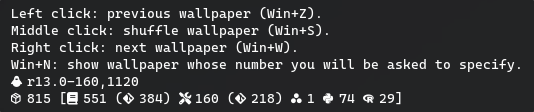
| Tooltip text | Left click: previous wallpaper (Win+Z).
Middle click: shuffle wallpaper (Win+S).
Right click: next wallpaper (Win+W).
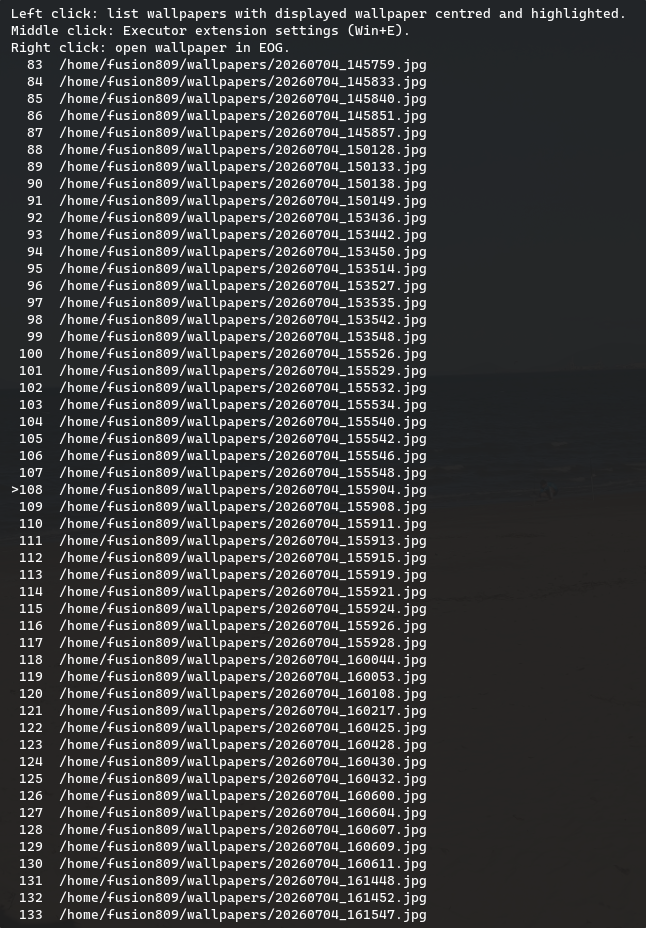
Win+N: show wallpaper whose number you will be asked to specify. | Left click: list wallpapers with displayed wallpaper centred and highlighted.
Middle click: open Executor settings (Win+E).
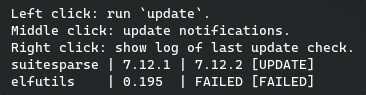
Right click: open wallpaper in EOG. | Left click: run `update`.
Middle click: update notifications.
Right click: show log of last update check. |
| Tooltip command | ~/lfs_scripts/left_widget_tooltip_command.sh — generates a line describing the version of LFS/BLFS installed, along with the number of packages installed via different means, and package inventory commit numbers in a similar format as in the Fastfetch output. Also includes lines indicating how far into the current run of autobuild <package> the system is. Finally, if autobuild isn't running, it will print out when autobuild last ran and what package it was last run on. | ~/lfs_scripts/centre_widget_tooltip_command_wrap.sh — lists selected wallpaper (indicated with >) and the 25 wallpapers before and after this one. If there are not 25 wallpapers before the current one, it will show some of the last wallpapers in the collection before the wallpaper numbered 1 to ensure that 51 wallpapers are listed (including the one set as the desktop background). If there are not 25 wallpapers after the current one, it will show some of the first wallpapers in the collection after the final one in the list to ensure that 51 wallpapers are listed in total. | ~/lfs_scripts/update-table.sh — generates a more compact table of packages with updates, missing inventories and versioning failures. |
Table 4: Example tooltip contents. | Left | Centre | Right |
 |  |  |
BLFS did not provide a gnome-browser-connector package, which is required for installing GNOME extensions within one's browser. Manually compiling and installing it was fairly easy, however. That being said, whenever I tried to install an extension using it, I noticed that the extension was not successfully installed despite there being a folder in ~/.local/share/gnome-shell/extensions for it. As this folder would be completely empty. Why? Well, running strace on GNOME shell revealed the problem was actually that the gnome-browser-connector was running unzip commands that assumed that Info-ZIP's unzip command was installed, not the bsdunzip variety provided by libarchive (which is the only one provided by BLFS or LFS).
I tried compiling Info-ZIP's unzip, such as by following some old BLFS instructions but this failed as Info-ZIP's unzip has not been updated since ~2009 and requires multiple intricate patches to get it to compile. The consolidated patch provided by BLFS was not even sufficient, even after I located the patch (the link provided in the book entry shared is actually dead, so I had to find a link to the patch elsewhere by Googling).
Luckily, ChatGPT provided a script version of unzip that would run bsdtar in the background and could take all the arguments that gnome-browser-connector provided it. I have since included this script in my custom package for libarchive.
KDE Plasma was the second desktop I installed. Panel Spacer Extended extension is installed, as is the Command Output Plasma widget.