GNOME was the first desktop I installed and is the main user interface I use in the virtual machine. My NixOS system uses Hyprland instead, but I have struggled to get Hyprland to actually work in a KVM/QEMU virtual machine, so I decided to just use GNOME in the LFS VM.
I have the following extensions running in the above screenshot:
ArcMenu — which provides the application menu (denoted by the Tux logo) in the top left corner of the screen.
Dash to Dock — which provides the dock for running applications in the bottom centre of the screen.
Extension List — which provides a list of extensions with settings and on/off button in the GNOME panel.
Executor fork — see below for details.
Show Desktop Button — which provides a button to show/hide the desktop in the GNOME panel.
Super Into Apps — which allows one to show the applications menu by pressing the Super (or Win) button.
Table 2: GNOME themes. | Cursor | Legacy applications | Icons | Shell |
| WhiteSur-cursors | WhiteSur-Dark | WhiteSur-dark | TST - Semi Transparent |
Has ~/lfs_packaging package called executor. It can be installed via more standard ways, too.
The base Executor extension provides up to three widgets in the GNOME panel on the left, centre and right of the panel. In these widgets is displayed the output of specified commands. The interval at which the command is re-run can also be specified. The Executor fork I maintain provides the following additional features:
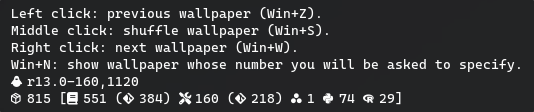
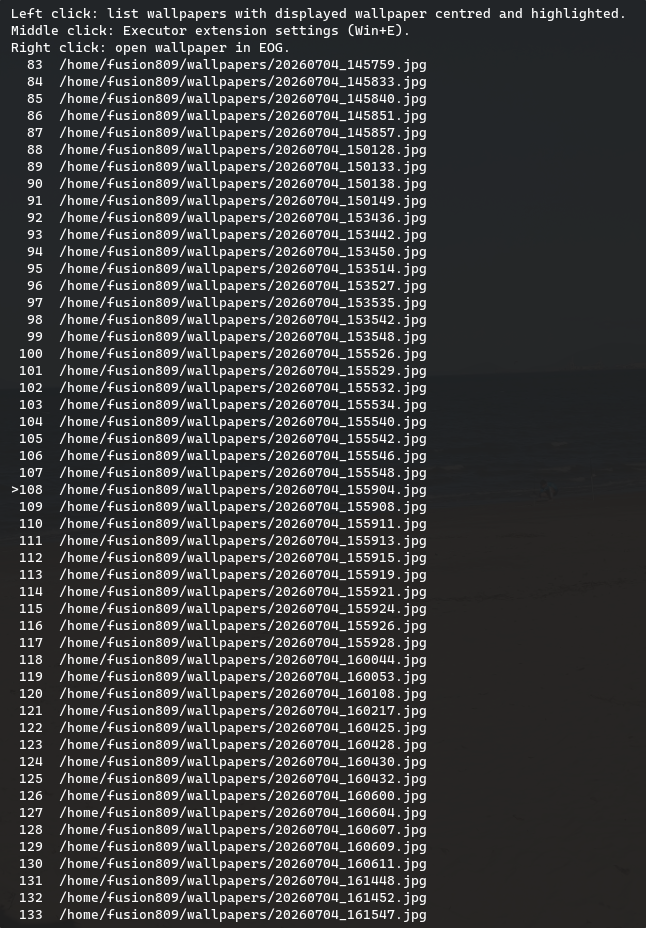
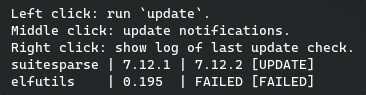
Tooltips — which can have two components. They are, in order: (1) static text and (2) command output.
Command execution when the panel widget is clicked, with separate commands for left-, middle-, and right-click actions.
Table 3: my Executor extension settings. | Field | Left widget | Centre widget | Right widget |
| Index in widget | 3 | 2 | 2 |
| Output command | ~/lfs_scripts/left_widget_command.sh — displays the boot time and age of the system. The age is displayed as days/minutes/years hours:minutes:seconds. In my set up, it is used to generate output for the left widget. Runs every 60ms. | ~/lfs_scripts/centre_widget_command.sh — displays CPU, RAM and root filesystem usage percentage and the number of the currently shown wallpaper / the total number of wallpapers in ~/wallpapers. Runs every millisecond. | ~/lfs_scripts/updates_no.sh — checks for updates using the updates command in the shell profile. It displays $in_progress $updates_med_duration ($updates_iqr_duration) $mod_time $no_updates $no_missing_total $no_failed$failed_version where $in_progress is replaced with nothing if the updates command is not running, and ${percent}% otherwise, where $percent is an approximation of how far through the running of updates we are. $updates_med_duration is the median duration, in minutes and seconds, of the run of updates based on ~/logs/updates_duration.log. $updates_iqr_duration is the interquartile range of the duration of updates runs. $mod_time is replaced with the time the updates command last stopped running. $no_updates is replaced with the number of available package updates. $no_missing_total is replaced with the number of packages with missing inventories. $no_failed is replaced with the number of package versioning failures. $failed_version, if ~/log/failed_versioning.log is not empty, is replaced by F and the number of packages with version failures in ~/logs/failed_versioning.log. updates runs every 5 minutes - the median duration of updates runs - the IQR of duration of updates runs. updates_no.sh is run every millisecond. |
| Left-click command | ~/lfs_apps/cycle-wallpaper-previous.sh — show previous wallpaper. | gnome-terminal -- zsh -ic ~/lfs_scripts/list-wallpapers.sh — displays the list of wallpapers in `~/wallpapers` with the currently shown wallpaper highlighted and centred. | gnome-terminal -- zsh -ic "updatec; exec zsh" — updates the system's packages, including those installed via book instructions, custom packages and pip-managed packages and removes unneeded files. |
| Middle-click command | ~/lfs_apps/cycle-wallpaper-shuffle.sh — show a randomly-selected wallpaper. | gnome-extensions prefs executor@raujonas.github.io — opens the settings dialog for Executor. | gnome-terminal -- zsh -ic "source ~/lfs_scripts/updates_no_func.sh; silent_updates" — runs updates to update the output shown in the widget. |
| Right-click command | ~/lfs_apps/cycle-wallpaper.sh — show next wallpaper. | ~/lfs_scripts/open-wallpaper.sh — opens the displayed wallpaper in Eye of GNOME. | gnome-terminal -- zsh -ic "tail -f ~/updates.log" — opens a terminal and follows the output of the updates command being used to generate the widget content. |
| Tooltip text | Left click: previous wallpaper (Win+Z).
Middle click: shuffle wallpaper (Win+S).
Right click: next wallpaper (Win+W).
Win+N: show wallpaper whose number you will be asked to specify. | Left click: list wallpapers with displayed wallpaper centred and highlighted.
Middle click: open Executor settings (Win+E).
Right click: open wallpaper in EOG. | Left click: run `update`.
Middle click: update notifications.
Right click: show log of last update check. |
| Tooltip command | ~/lfs_scripts/left_widget_tooltip_command.sh — generates a line describing the version of LFS/BLFS installed, along with the number of packages installed via different means, and package inventory commit numbers in a similar format as in the Fastfetch output. Also includes lines indicating how far into the current run of autobuild <package> the system is. Finally, if autobuild isn't running, it will print out when autobuild last ran and what package it was last run on. | ~/lfs_scripts/centre_widget_tooltip_command_wrap.sh — lists selected wallpaper (indicated with >) and the 25 wallpapers before and after this one. If there are not 25 wallpapers before the current one, it will show some of the last wallpapers in the collection before the wallpaper numbered 1 to ensure that 51 wallpapers are listed (including the one set as the desktop background). If there are not 25 wallpapers after the current one, it will show some of the first wallpapers in the collection after the final one in the list to ensure that 51 wallpapers are listed in total. | ~/lfs_scripts/update-table.sh — generates a more compact table of packages with updates, missing inventories and versioning failures. |
Table 4: Example tooltip contents. | Left | Centre | Right |
 |  |  |
BLFS did not provide a gnome-browser-connector package, which is required for installing GNOME extensions within one's browser. Manually compiling and installing it was fairly easy, however. That being said, whenever I tried to install an extension using it, I noticed that the extension was not successfully installed despite there being a folder in ~/.local/share/gnome-shell/extensions for it. As this folder would be completely empty. Why? Well, running strace on GNOME shell revealed the problem was actually that the gnome-browser-connector was running unzip commands that assumed that Info-ZIP's unzip command was installed, not the bsdunzip variety provided by libarchive (which is the only one provided by BLFS or LFS).
I tried compiling Info-ZIP's unzip, such as by following some old BLFS instructions but this failed as Info-ZIP's unzip has not been updated since ~2009 and requires multiple intricate patches to get it to compile. The consolidated patch provided by BLFS was not even sufficient, even after I located the patch (the link provided in the book entry shared is actually dead, so I had to find a link to the patch elsewhere by Googling).
Luckily, ChatGPT provided a script version of unzip that would run bsdtar in the background and could take all the arguments that gnome-browser-connector provided it. I have since included this script in my custom package for libarchive.